You are here: Home > Google Chrome Themes
Designed by Andrew.
If you’re not happy with the default skin of Google Chrome, you can download alternative theme files. Go to ChromoFans and look for something you like. Here's a Burlywood Google Chrome Theme.
What is burlywood? Burlywood is a brown sandy colour, the RGB value is #DEB887.
| burlywood colour: |
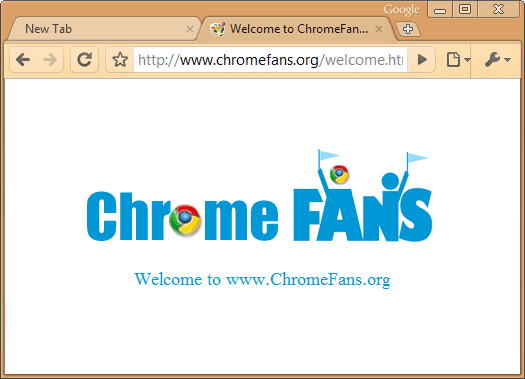
The screenshots of Google Chrome Burlywood Theme
Download Burlywood Google Chrome Theme
- Theme file: burlywood-google-chrome-theme.crx
- File size: 108 KB

Install Burlywood Google Chrome Theme
- Themes require Google Chrome 3.0+, if you want to apply these themes, please download and install Google Chrome 3.0 (BETA) first.
- Click above Free Download Now button
- The theme is downloaded as a .crx file to your computer. Confirm your download by clicking Save for the file in the Downloads bar.
- The theme will be applied immediately. If you change your mind, just click Back to default in the message that appears at the top of page to go back to the classic Google Chrome theme
-
Download Burlywood Google Chrome Theme first. -
Uncompressed the zip file to your local folder. Each zip file contains two files: the Google Chrome Theme file called "default.dll" and help document called "readme.htm" -
Close Google Chrome if you haved launched it. -
Replace your original default.dll(I suggest you make a backup of the original first). Here's the path where you need to replace the file: In Vista: C:/Users/[your user name]/AppData/Local/Google/Chrome/Application/[current version]/Themes/-
In Windows XP: C:/Documents and Settings/User/Local Settings/Application Data/Google/Chrome/Application[current version]/Themes/ Restart your Google Chrome.
Version List
- Sep 10, 2008: version 1.0.
- Nov 17, 2008: version 2.0, compatible with Google Chrome 0.3.154.9
- Aug 06, 2009: version 3.0, compatible with Google Chrome 3.0 (Beta)
- Previous article: Easy Create your Google Chrome Themes by Google Chrome Theme Builder
- Next article: Download Chocolate Google Chrome Theme
Comments:
#1 nomis posted on November 07, 2008 07:27 PST
I tried replacing the default.dll in the required directory, with the one from your skin and and my Chrome didn`t want to start again, showing me the crashing message, so I had to copy back the previous default.dll. The crashing problem appeared everytime I tried replacing the default.dll with another one (skin).
Any suggestions?
p.s. I got the latest version of Google chrome.
Any suggestions?
p.s. I got the latest version of Google chrome.
Andrew replied on November 17, 2008 05:59 PST:
Hi, I just fixed this problem. please re-download. :-)
Hi, I just fixed this problem. please re-download. :-)
#2 aishik posted on April 17, 2009 04:26 PDT
I could not even find the Google Chrome folder in C:/
My windows is pirated
i have downloaded google chrome
how will i fix it????
bye :-(
My windows is pirated
i have downloaded google chrome
how will i fix it????
bye :-(
#3 Mohammed Adil Farooqui posted on June 18, 2009 07:00 PDT
aishik, to find your folder of Chrome. Find a shortcut of Google Chrome (anywhere) and right click it and left click properties. Then copy the target all the way upto D:\Documents and Settings\Mohammed Adil.ADIL\Local Settings\Application Data\Google\Chrome\Application\ or C:\Documents and Settings\Mohammed Adil.ADIL\Local Settings\Application Data\Google\Chrome\Application\ or E:\Documents and Settings\Mohammed Adil.ADIL\Local Settings\Application Data\Google\Chrome\Application\
Now just go to name of the folder with the version of your current Chrome and then go to themes and paste the default.dll file there.
Note:- This skin does not work for version 2.0
Now just go to name of the folder with the version of your current Chrome and then go to themes and paste the default.dll file there.
Note:- This skin does not work for version 2.0
#4 Andrew@ChromeFans posted on August 07, 2009 10:14 PDT
Hi everyone, I just updated Burlywood theme to version 3.0, it compatible with Google Chrome 3.0 (Beta) now, please re-download and install it.
Download Burlywood Google Chrome Theme