
After the great success of Samsung Galaxy S, Samsung has launched Samsung Galaxy S2 i9100: 116g weight, 480 x 800 pixels, 1.2 GHz dual-core processor, Adreno 220 GPU, 1 GB of RAM and 3264x2448 pixels camera. This article will help you root the latest firmware on your Samsung Galaxy S2 GT-i9100 by one clicking. I tested with Android 2.3.3, it works fine. If you are not sure what firmware you have, go to Settings and About Phone.
Requirements for rooting Samsung Galaxy S2 GT i9100
- Samsung Galaxy S2 GT i9100
- USB data cable
- DooMLoRD_v3_ROOT-zergRush-busybox-su.zip. You can get this file by searching Google
- Windows with ADB drivers
Tutorial: Root Samsung Galaxy S2 GT i9100
- Make sure you have installed the ADB drivers for your device. There is an article: How to install ADB With Android SDK.
- Enable USB Debugging: Click menu Settings > Applications > Development, check the option "USB Debugging".
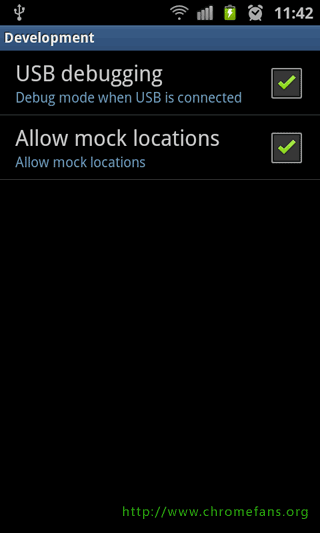
Screenshot: Root Samsung Galaxy S2 GT i9100, Enable USB Debugging
- Enable Unknown sources: Clicking menu Settings > Applications, check the option "Unknown sources.
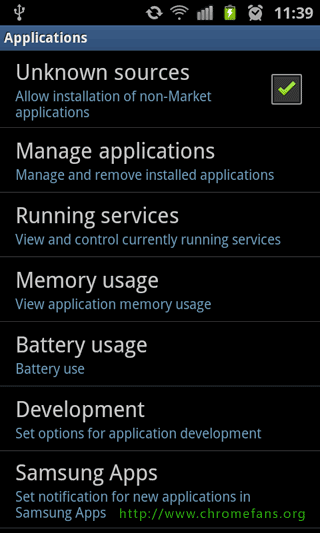
Screenshot: Root Samsung Galaxy S2 GT i9100, Enable Unknown sources
- Connect USB date cable to i9100 and then connect to computer.
- Download DooMLoRD_v3_ROOT-zergRush-busybox-su.zip (Please get this file by searching Google), and then extract all files to a folder.
- Launch runme.bat. If your OS is Windows Vista or Windows 7, please right click the Runme.bat, then select "Run as administrator".
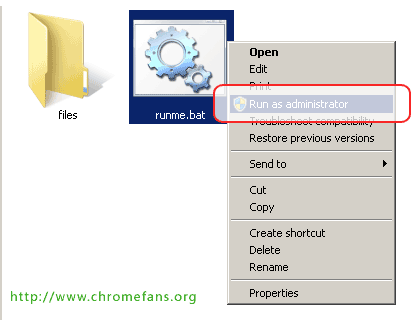
Screenshot: Root Samsung Galaxy S2 GT i9100, launch Runme.bat
- Follow the instructions, press any key to continue.
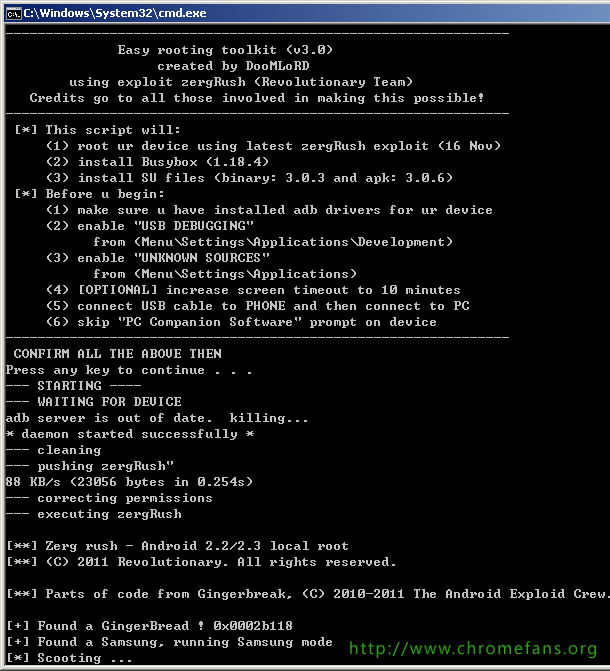
Screenshot: Root Root Samsung Galaxy S2 GT i9100
The logs for rooting Samsung Galaxy S2 GT i9100
I just rooted my Samsung Galaxy S2 GT i9100 with DooMLoRD_v3_ROOT-zergRush-busybox-su today. This is a log from my phone:
---------------------------------------------------------------
              Easy rooting toolkit (v3.0)
                   created by DooMLoRD
        using exploit zergRush (Revolutionary Team)
   Credits go to all those involved in making this possible!
---------------------------------------------------------------
 [*] This script will:
     (1) root ur device using latest zergRush exploit (16 Nov)
     (2) install Busybox (1.18.4)
     (3) install SU files (binary: 3.0.3 and apk: 3.0.6)
 [*] Before u begin:
     (1) make sure u have installed adb drivers for ur device
     (2) enable "USB DEBUGGING"
           from (Menu/Settings/Applications/Development)
     (3) enable "UNKNOWN SOURCES"
           from (Menu/Settings/Applications)
     (4) [OPTIONAL] increase screen timeout to 10 minutes
     (5) connect USB cable to PHONE and then connect to PC
     (6) skip "PC Companion Software" prompt on device
---------------------------------------------------------------
 CONFIRM ALL THE ABOVE THEN
Press any key to continue . . .
--- STARTING ----
--- WAITING FOR DEVICE
adb server is out of date.  killing...
* daemon started successfully *
--- cleaning
--- pushing zergRush"
88 KB/s (23056 bytes in 0.254s)
--- correcting permissions
--- executing zergRush

[**] Zerg rush - Android 2.2/2.3 local root
[**] (C) 2011 Revolutionary. All rights reserved.

[**] Parts of code from Gingerbreak, (C) 2010-2011 The Android Exploid Crew.

[+] Found a GingerBread ! 0x0002b118
[+] Found a Samsung, running Samsung mode
[*] Scooting ...
[*] Sleeping a bit (~40s)...
[*] Waking !
[*] Sending 149 zerglings ...
[+] Zerglings found a way to enter ! 0x10
[+] Overseer found a path ! 0x0002d4b8
[*] Sleeping a bit (~40s)...
[*] Waking !
[*] Sending 149 zerglings ...
[+] Overseer found a path ! 0x0002d580
[*] Sleeping a bit (~40s)...
[*] Waking !
[*] Sending 149 zerglings ...
[+] Zerglings caused crash (good news): 0x40319cd4 0x0054
[*] Researching Metabolic Boost ...
[+] Speedlings on the go ! 0xafd1963b 0xafd3933f
[*] Sleeping a bit (~40s)...
[*] Waking !
[*] Popping 24 more zerglings
[*] Sending 173 zerglings ...

[+] Rush did it ! It's a GG, man !
[+] Killing ADB and restarting as root... enjoy!
--- WAITING FOR DEVICE TO RECONNECT
if it gets stuck over here for a long time then try:
   disconnect usb cable and reconnect it
   toggle "USB DEBUGGING" (first disable it then enable it)
--- DEVICE FOUND
--- pushing busybox
416 KB/s (1075144 bytes in 2.520s)
--- correcting permissions
--- remounting /system
--- copying busybox to /system/xbin/
2099+1 records in
2099+1 records out
1075144 bytes transferred in 0.470 secs (2287540 bytes/sec)
--- correcting ownership
--- correcting permissions
--- installing busybox
--- pushing SU binary
116 KB/s (22228 bytes in 0.187s)
--- correcting ownership
--- correcting permissions
--- correcting symlinks
--- pushing Superuser app
180 KB/s (785801 bytes in 4.241s)
--- cleaning
--- rebooting
ALL DONE!!!
Press any key to continue . . .
Other resources about Android and Samsung i9100
- How to install Chrome for Android beta
- Amazon: Samsung i9100 Galaxy S II Unlocked GSM Smartphone with 8 MP Camera, Android OS, 16 GB Internal Memory, Touchscreen, Wi-Fi, and GPS--No Warranty (Noble Black)
- Wikipedia: Rooting Android OS - Rooting is a process allowing users of mobile phones, tablet PCs, and other devices running the Android operating system to attain privileged control (known as "root access") within Android's subsystem.

- Previous article: How to install ADB with Android SDK
- Next article: How to disable the camera shutter and auto-focus sounds on your Samsung Galaxy S2 I9100?
How to root Samsung Galaxy S2 GT i9100 by one clicking