You are here: Home > Google Chrome Extensions & Plug-ins
Posted by Andrew.
If you want to access Chrome Downloads Manager window, normally, there are three ways:
1. Cick the menu "Tools -> Downloads"
2. Press key "Ctrl + J"
3. Type chrome://downloads/ in the address bar

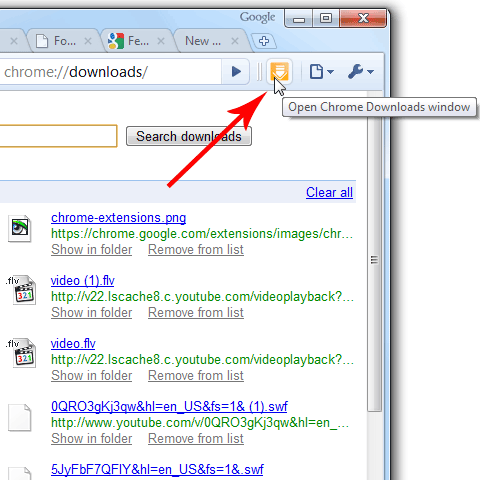
However, pressing Ctrl+J is just so hard, clicking menu or typing commands takes a "long time", so I developed a simple Chrome Downloads Extension for lazy man: visit Downloads Manager directly by one click from the toolbar. :-)
Install Chrome Downloads Extension
I have uploaded this extension to Google Extensions gallery, to install Downloads Extension in your Chrome browser, just follow the steps below:
- Visit Chrome Downloads Extension
- Click Install button
- A Confirm Installation dialog shows, click Install button.
The screenshot of Chrome Downloads Extension
If you have any suggestions about this extension, please leave your comments here. :)
Other resource
- Free download Chrome extensions and bookmarks
- Google Chrome extension tutorial for developers
- Official Google Chrome Extension gallery
- All Google Chrome users on PCs can access over 1,500 new features, through our new extension system
- A new beta of Google Chrome for Mac - with extensions and more
- Download freeware and shareware at FreshShare
- Previous article: Google Chrome extension: everymark - everything search on bookmarks
- Next article: Update: PageRank Status extension v3.0 for Google Chrome
Comments:
#1 tiffany jewellery posted on March 09, 2010 23:07 PST
this extension to Google Extensions Center, to install Downloads Extension in your Chrome browser, just follow the
#2 Ochieng Kassedde Romeo posted on April 01, 2010 08:02 PDT
This service is awesome guys,keep it up
#3 KiRa502 posted on April 02, 2010 04:35 PDT
Hope can use it along with idm, wellget, etc etc...just like flashgot for mozilla
#4 EriM posted on April 25, 2010 13:45 PDT
I think that Internet Explorer 8 is safer. Still, I prefer Chrome :-)
And Chrome extensions are great. EriM / Slovakia
And Chrome extensions are great. EriM / Slovakia
#5 kraam posted on June 23, 2010 00:45 PDT
if it supports resume capability.
it will be awesome.
chromo is great and faster.
it will be awesome.
chromo is great and faster.
#6 rashel posted on July 05, 2010 10:51 PDT
Anti bad activities!
#7 Carlos Solis posted on August 27, 2010 13:56 PDT
What I would like is a replacement of the Firefox download manager. For example, a button to clear finished downloads, and a button to pause them.
#8 Gabriel posted on November 06, 2010 18:21 PDT
Why dont you make a popup box? It would be nice .... I've been searching a download extension to popup a box with the downloads but there are none.
#9 steve posted on December 15, 2011 01:29 PST
Unbelivable ??? How to get rid of philosofing abaut it and simply clean row preview like for firefox addons extensions download and install ! Simply can not find download extension link ! What is going on ???? Are you lost all your compass-es or what ??? Tons of useless web pages to philosofing abaut it !!!! Unless you have a turbo capitalism attempt to exploit user's pocket ??? And where is so called speed loading web page's i see none and strain cpu and os also to 100% ! What kind of browser is more hardware/software demanding as some mehanical software like CAD/PTC/Ansys and others ??? For browsing internet we need some more supercomputer power as for mehanical engeeniering ??? How abaut Web browser programmend in assembler small efficient fast and secure without the bloated contend and optimized for that one task ??? No one is optimixe code any more so we get more and more bloated non eficient os and software that runs on it ! Thus so many problems ! And one more - why web page interact with os and then cripple it ??? Who has such interest to do so ??? Isolate god damn browser for good from os in secure user space !!!! And we user are fuckt up every time we use internet !
#10 Brian posted on February 16, 2012 18:56 PST
Hi, I cannot find an extension anywhere that will open a SMALL window to manage downloads. Yours is the closest I've found, but it open a giant window that does not retain it's size if I resize it and then close it. I want a download popup like firefox. I don't want firefox! I just want that one feature. It drives me crazy. Any help would be appreciated.
Thanks,
Brian
bwhurd@gmail.com
Thanks,
Brian
bwhurd@gmail.com
Andrew replied on February 17, 2012 03:41 PST:
Hi Brian,
Thank you for your suggestions. I will add an option to open the downloads page in new tab. :)
Hi Brian,
Thank you for your suggestions. I will add an option to open the downloads page in new tab. :)
#11 виктория posted on August 16, 2012 07:27 PDT
где можно скачать расширение для того чтобы скачивать google play market?зарение спасибо.
Google Chrome Downloads Extension