Posted by Andrew.
A password is your first and last line of defense in computer security. Typically people choose bad passwords because they are easy to remember. However, you wouldn't leave the door to your home unlocked because it is too much of a hassle to unlock it before you open the door, would you? A weak password is the same thing.

Using words that appear in a dictionary, in any language, make cracking your password that much easier. A true strong password should consist of 7 or more characters and combine with lower and upper case letters, numbers and punctuation symbols.
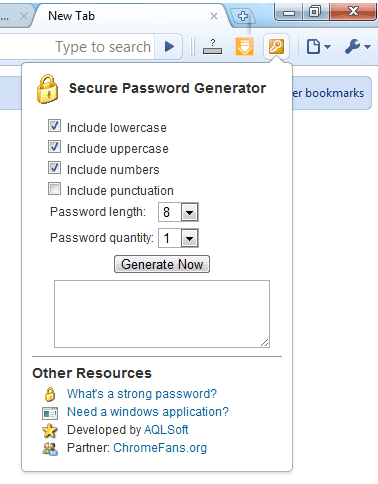
AQLSoft developed a Secure Password Generator extension for Google Chrome, it allows you to create random passwords that are highly secure and extremely difficult to crack or guess. This extension has been uploaded to Google Extensions gallery, to install it, please follow the steps below:
Install Secure Password Generator Extension
- Visit Secure Password Generator Extension in Google Extensions gallery.
- Click Install button
- A Confirm Installation dialog shows, click Install button.
If you want to a windows application to generate secure passwords, please download the installer from here.
The screenshot of Secure Password Generator Extension
Other resource
- Free download Chrome Extensions and Bookmarks
- How do I adjust my security settings to high level?
- Google Chrome: New security features
- What's a Strong Password?
- Chrome Privacy Protector
- Google Blog: Does your password past test?
- Official Google Extensions gallery
- A polyglot Google Chrome beta, with new privacy features
- Tips for Cleaning & Securing Your Website
- Previous article: Update: Chrome Downloads Extension v1.21
- Next article: PasteBin extension: Quickly paste any type of text to the Pastebin.com
http://focusnewsworld.blogspot.com
http://focusnewsworld.blogspot.com
Google Chrome Extension: Secure Password Generator